
Animator#
The Animator Widget provides controls for image frames, channels, and polarization to be displayed in the Image Viewer Widget. Animation playback can be enabled with this widget to assist users in visual inspection of image cubes.
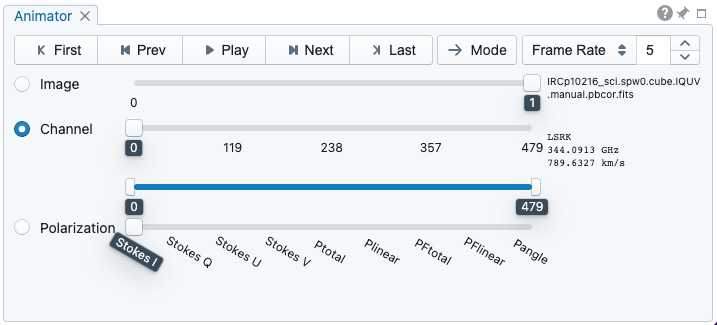
Switching images and channels#
When multiple images are loaded via “File” -> “Append image”, the “Image” slider will show up and allow you to switch to a different image. You can also use the Image List Widget for image switching. If an image file has multiple channels, the “Channel” slider will appear. The double slider right below the “Channel” slider allows you to specify a range of channels for animation playback.
Polarization components#
If an image file has multiple polarization components, the “Polarization” slider will appear. The polarization slider shows all the polarization components (Stokes I/Q/U/V, XX/YY/XY/YX, or RR/LL/RL/LR) as defined in the image header. If the Stokes parameters are defined in the image header, additional computed components are appended as well including:
Ptotal: total polarization intensity (computed from Stokes QU or QUV)
Plinear: linear polarization intensity (computed from Stokes QU)
PFtotal: fractional total polarization intensity (computed from Stokes IQU or IQUV)
PFlinear: fractional linear polarization intensity (computed from Stokes IQU)
Pangle: linear polarization angle (computed from Stokes QU)
You may save a computed component as a new image file via “File” -> “Save image”.
Animation playback#
At the top of the Animator Widget there is a set of animation control buttons such as “Play”, “Next”, etc. Playback modes, including “forward”, “backward”, “Bouncing”, and “Blink”, are supported. Playback action will be applied to the slider with the activated radio button.
The “Frame Rate” spin box controls the desired frame per second (fps). The actual frame rate depends on image size and internet condition. Optionally, you can set a step for the animation playback (default as unity). By clicking the “Frame Rate” dropdown, the “Step” option will show up.