
Appendix A: version history#
What’s new#
This section highlights the new features and enhancements in the latest stable release of CARTA.
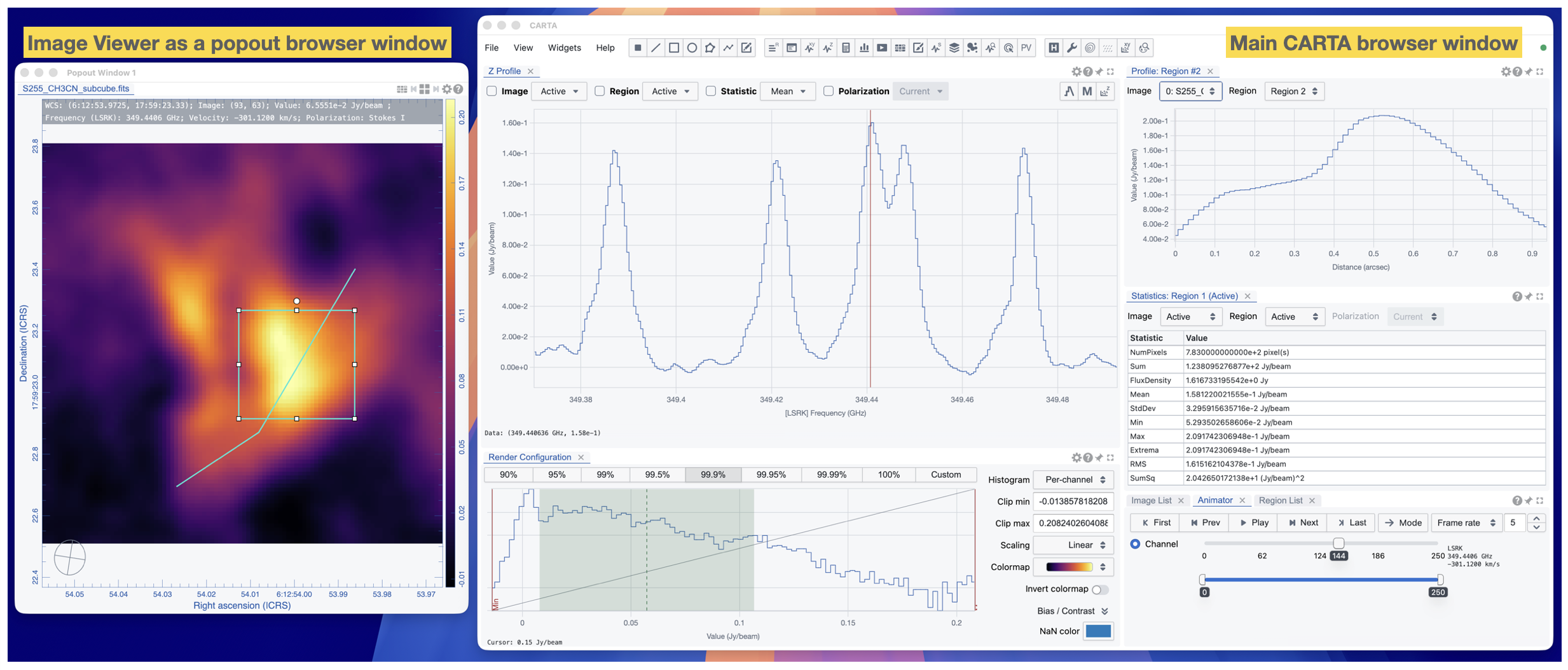
Image Viewer as a popout browser window#
For codebase dependency and security concerns, CARTA v6.0 adopts a new layout management library, FlexLayout, to replace the previous GoldenLayout library. The new library provides the same layout management features with a slightly different GUI appearance compared to the previous one, but with a more modern and secure codebase. In addition, the popout window feature is enabled to allow the Image Viewer to be popped out as a new browser window. This is particularly useful for users with multiple monitors, allowing them to view the Image Viewer in a separate window while keeping other widgets in the main browser window. The example below shows the Image Viewer popped out as a new browser window while the main browser window is used to display other widgets.
Region of interest enhancements#
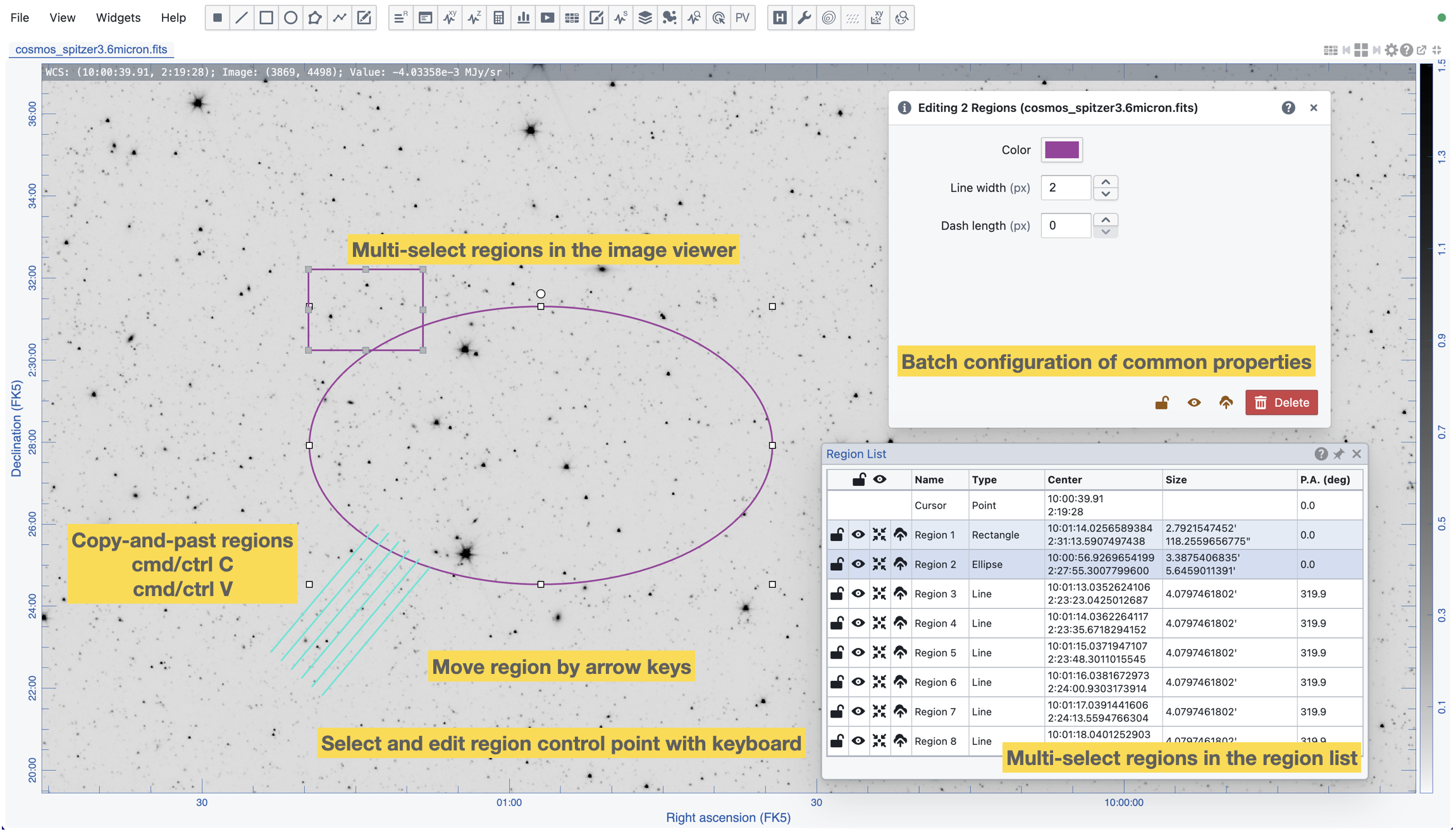
CARTA v6.0 provides a set of enhancements to the region of interest (ROI) feature, including:
Copy and paste region
Multiple region selection and batch configuration
Keyboard controls for region manipulation
Matching enhancements#
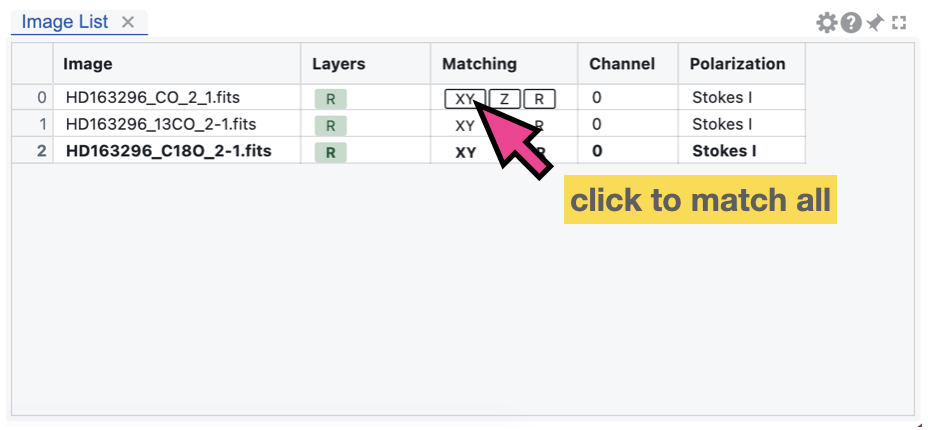
CARTA v6.0 provides a set of new shortcut buttons in the Image List Widget to enable or disable quick matching of all loaded images to the reference image in spatial coordinates (XY), spectral coordinates (Z), and raster rendering configuration (R). This allows users to quickly set up the matching status of all loaded images with a single click, which is particularly useful when there are many images loaded in the session. If there are images that cannot be spatially and/or spectrally matched, they will be ignored with a warning message.
Offset coordinate grid enhancements#
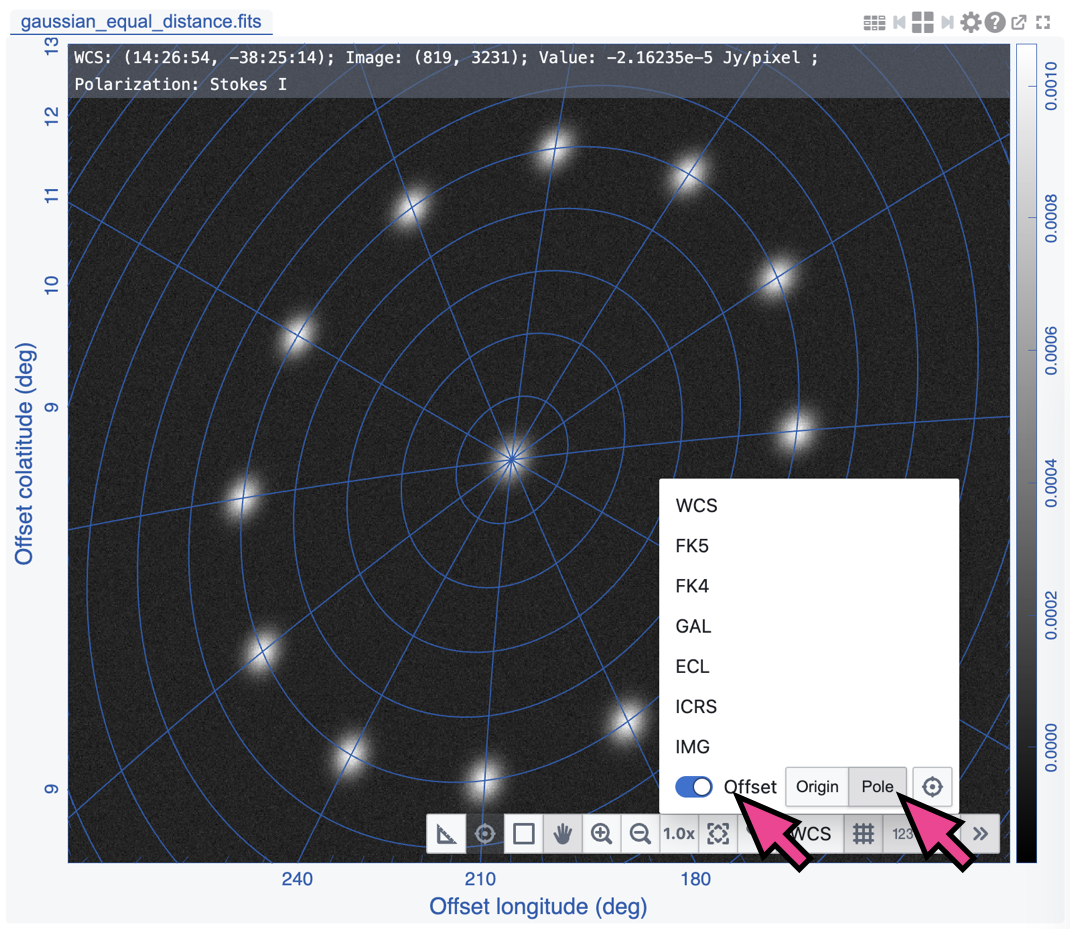
CARTA v6.0 offsets a new mode - “Pole” - to the offset coordinate system. This allows users to set the pole of the offset coordinate system to a specific position on the image and render colongtidue and colatitude grid lines based on the defined pole. The screenshot below provides a demostration of the new mode. The “rings” represent the equal-distance lines to the defined pole. This feature could be used for targets with symmetry around a specific point or used for planning observing proposals as a visualization of different sources with their relative positions to a specific target, such as a calibrator.
Catalog widget enhancements#
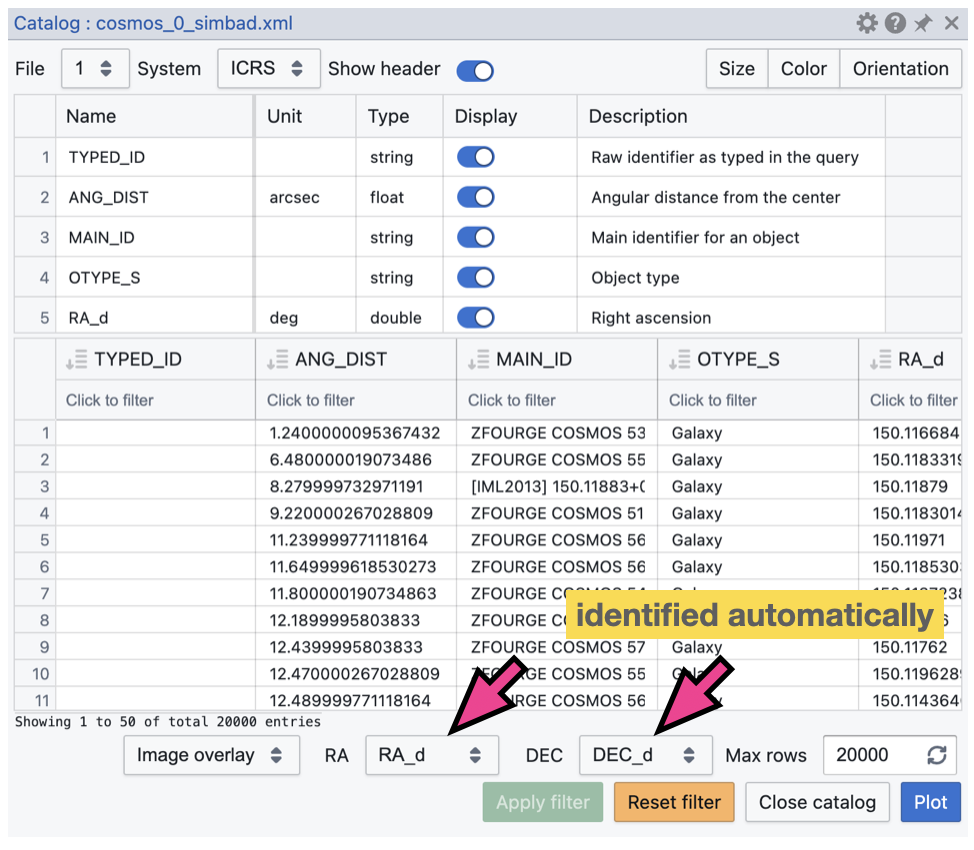
CARTA v6.0 provides an enhancement to the Catalog Widget to automatically select the celestial coordinate columns in the catalog table. This allows users to quickly visualize the catalog sources on the image without having to manually select the coordinate columns, which is particularly useful when there are many columns in the catalog table. The screenshot below shows an example of the auto-selection of celestial coordinate columns in the Catalog Widget.
macOS Electron Desktop application enhancements#
CARTA v6.0 deployed as a macOS Electron Desktop application provides two new enhancements:
Auto-updater: The CARTA Electron app can now automatically check for updates and prompt the user to download and install the latest version. This provides a seamless update experience for users, ensuring that they are notified of new releases and can easily update to the latest version without having to manually check for updates and download the dmg file.
FITS file association: The CARTA Electron app can now be associated with FITS files on macOS. This allows users to open FITS files directly with the CARTA app by double-clicking on the file or by using the “Open With” context menu. This provides a more convenient way for users to open FITS files with CARTA without having to manually launch the app and load the file. Users can also drag and drop a FITS image file or a set of FITS image files from Finder to the CARTA application icon in the Dock to open the image or images in CARTA. Users may also drag and drop a FITS image file or a set of FITS image files from Finder to the CARTA application window to open or append the image or images in the current session of CARTA.
Homebrew installation method deprecation#
CARTA v6.0 deprecates the Homebrew installation method for the macOS platform. The Homebrew installation method will no longer be maintained and supported in this and future releases of CARTA. Users are encouraged to switch to the macOS Electron Desktop application. The main reason for this deprecation is that in fact previous installation via Homebrew is bascially installing the Electron app, but following Homebrew’s installation protocal. In addtion, the new Electron Desktop application now provides an auto-update feature that allows users to get notified of new releases and easily update to the latest version without having to manually check for updates and download the dmg file. This provides a more seamless update experience for users, ensuring that they can easily stay up-to-date with the latest features and improvements in CARTA.
Version 6.0#
Released 30 June 2026
v6.0 is primarily a maintenance release to address codebase refactoring, library updates, bug fixes, and other technical debt. However, a few new features and enhancements are included in this release:
Copy and paste region
Keyboard controls for region manipulation
Quick XY/Z/R matching of all loaded images to the reference image
Support pole mode to the offset coordinate system
Support Image Viewer as a popup browser window
Auto-select celestial coordinate columns in the catalog widget
macOS Electron app only: FITS file association with the CARTA app
macOS Electron app only: support auto-update of the CARTA app for future new releases
See carta-frontend changelog and carta-backend changelog for details.
Version 5.1#
Released 3 February 2026
As a maintenance release, this version addresses critical bug fixes. No new feature or feature enhancement is included.
See carta-frontend changelog and carta-backend changelog for details.
Version 5.0#
Released 29 July 2025
Channel map view (raster only)
Multi-color image blending
HiPS2FITS online image query
Dynamic layout
Image coordinate and flexible offset coordinate
PV generator with a polyline region
New design of the in-app help and user manual
Enable the copy function in the cursor info widget
Support flux density calculations with various pixel units in the statistics widget
Support automatic generation of initial values for multiple Gaussian image fitting
Support sorting the spectral line table
Support changing the depth order of floating widget and dialog on select
A button for deleting all regions
Support setting a custom rest frequency for the moment maps
Support wavelength^2 as a new spectral convention
Support plotting catalog sources with a size in image pixel and in angular units
See carta-frontend changelog and carta-backend changelog for other improvements.
Version 4.1#
Released 23 January 2024
This is a maintenance release to address core library update and critical bugs. No new feature or feature enhancement is included.
Version 4.0#
Released 12th September 2023
Interactive PV preview
Enhanced PV generator
Initial support of workspace (save and restore)
Initial support of workspace sharing (carta-controller only; experimental)
Enhanced image fitting capabilities
Image annotation
Visualization of a rotated cube (no image analytics)
Support beam info for AIPS-generated cubes
Support animation playback with matched images in multi-panel view
A new dialog for angular distance measurement
Show/hide and lock all regions
Auto-scrolling the selected region into the region list view
Mirroring cursor markers on spatially matched images
Cursor info with dual spectral convention in the spectral profiler
Pan and zoom images with manual inputs
Switch directory path with manual input
Custom range and number of bins in the histogram calculation
See carta-frontend changelog and carta-backend changelog for other improvements.
Version 3.0#
Released 23rd August 2022
Vector overlay rendering
Loading images with the Lattice Expression Language (LEL)
Loading CASA images with pixel values as complex numbers
Initial implementation of image 2D Gaussian fitting
Generating computed polarization quantities (eg. linear polarization intensity) of a Stokes cube on the fly
Setting a new rest frequency when saving a subimage
Logging moment map generation information in header history
Line and polyline region spectral profiler
Initial implementation of PV image generator
Image file list filter
High-resolution PNG export
Enhanced spectral matching mode
Custom rest frequency for velocity conversion
Performance boost when loading a region file with massive amount of regions
Telemetry
Online catalog query from SIMBAD and VizieR
Region export and import enhancement
Initial implementation of intensity unit conversion
Multiple panel view
Pixel grid border rendering at high zoom levels
Interactive raster rendering with a cutoff via the interactive colorbar
Distance measuring tool
Spatial profiler widget enhancement
Histogram and statistics widget enhancement
Cursor Info Widget
Code snippets (experimental feature)
Support gzipped FITS images (fits.gz and fz)
HDF5 mip map support
Remember last used directory
Performance enhancement and bug fixes are included as well.
Version 2.0#
Released 7th June 2021
Multi-profile plot with the spectral profiler
Progress report and cancellation when requesting a long file list
Forming a Stokes hypercube at image loading stage
Colorbar display in the image viewer and enhanced raster image config widget
Support rectangular pixel rendering for PV image
Filtering function in the spectral line query widget
Enhanced FITS and CASA image support
Saving subimage
Searching a keyword from image header
Profile fitting in the spectral profiler
Marker-based catalog rendering and performance enhancement
New deployment modes
Performance enhancement and bug fixes are included as well.
Version 1.4#
Released 17th September 2020
Catalogue support
Shared region analytics
Animation playback improvement of raster and contour images
Profile smoothing
Moment map generator
Spectral line query
Server authentication and deployment improvements
File browser improvements
Performance enhancement and bug fixes are included as well.
Version 1.3.1#
Released 5th May 2020
Bug fixes
Truncated header values in HDF5 images.
Crashes when creating a region on a single channel image while the spectral profiler is launched.
Hanging when requesting statistics.
Correct axes labeling in region widget.
Swapped major/minor axes of ellipse when exporting as region file.
Incorrect or inaccurate angular size of rectangle and ellipse regions in the region dialog.
Server version database fix.
Version 1.3#
Released 31th March 2020
Contour rendering
Matching images in world coordinates
Support “Active” region type in analytics widgets
Enhanced remote mode for desktop version
Spectral conversion in the spectral profiler
Tiled animation
In-app help manual
Performance enhancement and bug fixes are included as well.
Version 1.2.2#
Released 3rd January 2020
Critical bug fix
Version 1.2.1#
Released 30th October 2019
Support region import/export in ds9 syntax
Critical bug fix
Version 1.2#
Released 28th August 2019
This release includes the following new features:
New server authentication method
User preferences and layouts
Tiled rendering and animator enhancement
support point and polygon regions
support region import/export in crtf syntax
introducing enhanced profile delivery strategies
new Stokes analysis widget
support HDF5 images under IDIA schema
Performance enhancement and bug fixes are included as well.
Version 1.1#
Released 2nd May 2019.
Initial support of region of interest and the HDF5-IDIA image format.
This version enables the initial support of region of interest and relevant analysis tools (statistics, histogram, region spectral profiler). Initial support of the HDF5-IDIA image format is implemented, which takes the advantage of pre-calculated data and rotated cube to speed up some time-consuming tasks. A basic server-side authentication model and command line startup options are provided. Performance enhancement and bug fixes are included as well.
Version 1.0.1#
Released 6th March 2019.
Patch release of version 1.0.
With version 1.0.1 patch release, CARTA futher provides enhanced file browser navigation capability, remote server (backend) status icon, improvements of file information and header, and displaying data values in the spatial and the spectral profilers.
Version 1.0#
Released 29th December 2018.
Initial release.
This version provides basic image viewing capabilities, basic profile viewing capabilities in both spatial and spectral domains, and basic per-frame or per-cube histogram viewing capabilities. Exporting images or charts in png format and charts in plain text format are supported.